

The below image demonstrates how the Action Management JSON Editor empowers users to exert precise control over actions through JSON code. Within Admin, the Action Management JSON Editor allows you to control actions using JSON code. With the Action Management JSON Editor you can:Documentation Index
Fetch the complete documentation index at: https://docs.kibocommerce.com/llms.txt
Use this file to discover all available pages before exploring further.
- Enable or disable the functions bound to actions installed on the sandbox.
- Specify settings, such as timeout and exception behavior, for individual actions.
- Provide custom information to individual actions and to the application that contains the actions.
- Specify logging behaviors associated with actions.
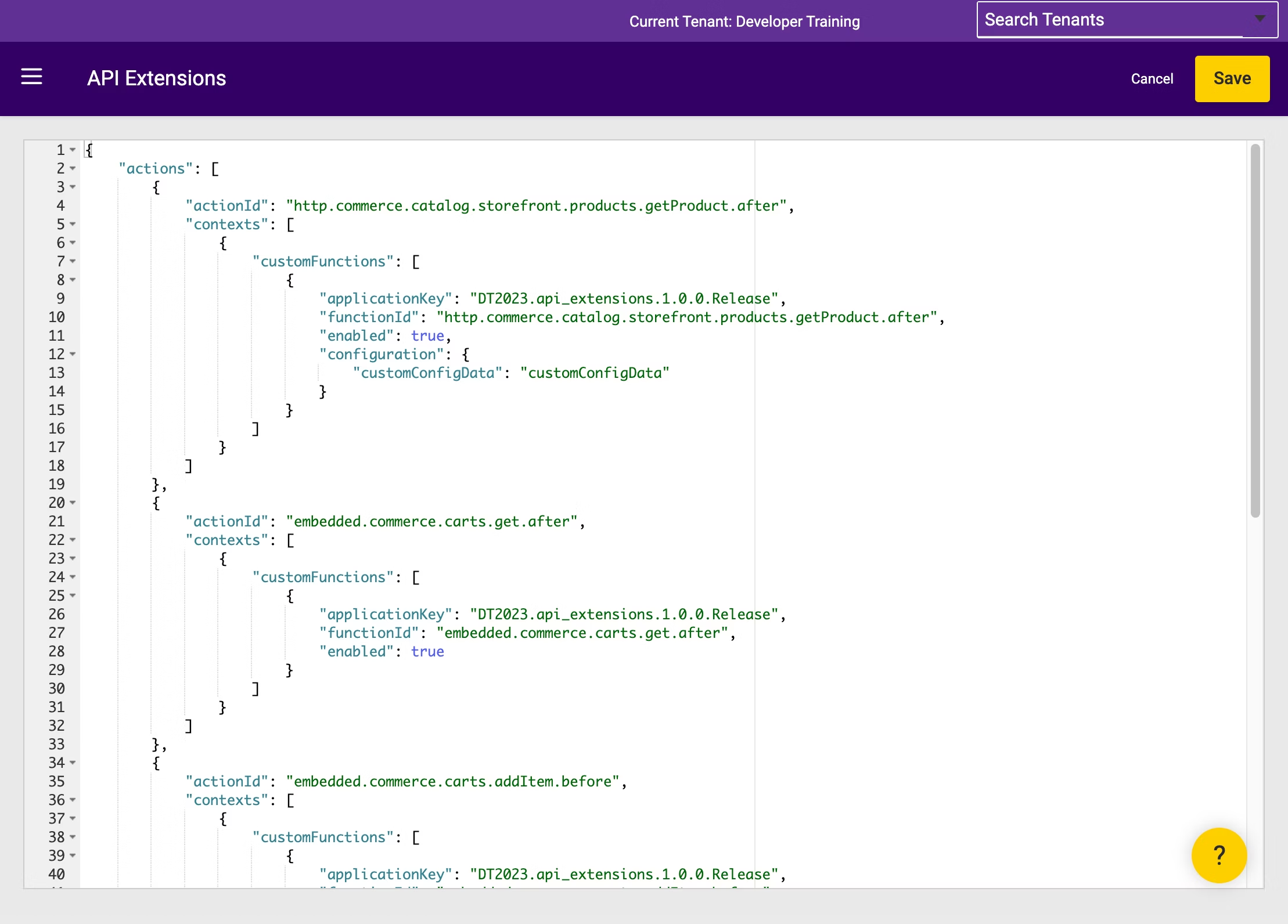
- Log in to Dev Center.
- View a sandbox.
- In Admin, go to System > Customization > API Extensions.
JSON Structure
With the Action Management JSON Editor, you specify which actions you have installed to a sandbox, the context each action applies to, and the settings an action uses in each context (i.e., the application key, the function you want to execute, and the custom configuration data you want to provide the action). You also specify the custom configuration data available to all actions in the application and the log level that actions use in the application. The following code block and table demonstrate the options you can configure with the Action Management JSON Editor.| Option | Description |
|---|---|
defaultLogLevel | Specifies which types of application logs display in Dev Center, based on priority level. Possible values mirror Apache’s log4net: All, Debug, Info, Warn, Error, Fatal, and Off. When deploying an API Extensions application to production, set this value to Error to avoid performance penalties. |
| actions | An array of actions. |
actionId | Identifies a specific action. This ID matches the naming conventions in the assets/functions.json file. |
| actions[ contexts ] | The per-site settings that apply to an individual action. |
context | (Optional) The siteId for the site you want to apply the nested settings to. You can omit this field if you want to apply the same settings to an action across all your sites. |
| actions[ contexts[ customFunctions ] ] | An array of custom functions tied to an action. Some actions can run only one function, but other functions can run multiple functions. |
applicationKey | The application key of the API Extensions application. |
functionId | The name of the custom function tied to the action, per the naming conventions set in the manifest files located in the assets/src directory. |
enabled | (Optional) A Boolean that controls whether the function is enabled or disabled. The default is true. |
timeoutMilliseconds | (Optional) The number of milliseconds the function is allowed to run before the platform terminates it. The default is 5000 milliseconds. The maximum allowed value is 25000 milliseconds — this is the platform’s hard execution ceiling. Setting this to 25000 does not make a slow action faster; it only extends the window during which a slow action can block the storefront. For storefront HTTP actions on high-traffic pages, set this to the smallest value that accommodates the action’s expected external call latency plus overhead, not the maximum. See Calling External APIs Safely for guidance on budgeting time across outbound calls. |
exceptionBehavior | (Optional) The behavior to take when an unhandled error is encountered, either fault or continue. The default is fault.fault propagates the error to the end-user request, which can return an error response to the shopper. continue swallows the error and lets the request proceed as if the action had not run. Use continue for non-critical enrichment actions where storefront availability is more important than extension correctness. Use fault for before actions where the extension output is required for the request to proceed correctly. |
logLevel | (Optional) Specifies which types of function-specific logs display in Dev Center, based on priority level. Possible values mirror Apache’s log4net: All, Debug, Info, Warn, Error, Fatal, and Off. When deploying an API Extensions application to production, set this value to Error to avoid performance penalties. |
| actions[ contexts[ customFunctions[ configuration ] ] ] | Custom function-level settings that you can create. If you create custom settings with the same names as custom settings created at the application level, these settings take precedence over the application-level configurations. |
yourCustomField | Custom object data. |
| configurations | Custom settings that apply to all actions in the API Extensions application. |
applicationKey | The application key of the API Extensions application. |
| configurations[ configuration ] | Custom application-level settings that you can create. If you create custom settings with the same names as custom settings created at the function level, these settings are overwritten by the function-level configurations. |
yourCustomField | Custom object data. |
Verify Enabled Functions Exist in the Deployed Application
If anactionId is configured with "enabled": true and a functionId that does not exist as a named export in the deployed application package, the platform logs an error of the form The App <key> has no export named <functionId> on every request that triggers the action. The action never runs successfully but still consumes runtime resources on each affected request.
Before enabling an action:
- Confirm that the
functionIdvalue matches a named export in the application’s builtassets. - Disable any
actionIdentries whose corresponding function is not yet deployed by setting"enabled": false. - When removing a function from an application, also remove or disable the corresponding
actionIdentry in the JSON editor.

